Faculty
Digital Toolbox
Module 2:
Collaboration with
Digital Tools
Lesson 2
Tool Tutorial
Read these steps to learn how to use Hypothesis.
You will have the opportunity to practice in Lesson 3.
Step 1: Go to https://web.hypothes.is/
Step 2: Log in using a Google account.
Step 2: Install the Google extension.
Step 3: In a Google Chrome browser, type the web link to your source. (You can also upload PDF files later.)
Step 4: Confirm that the Hypothesis icon (h.) at the top right is active.
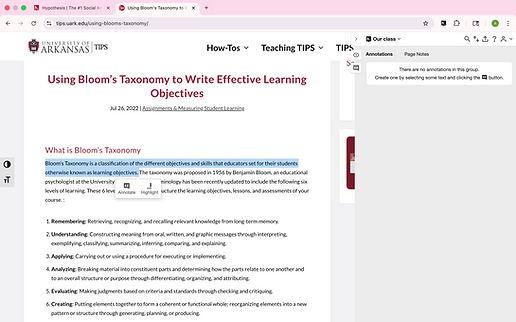
Step 5: Highlight your selected text.
Step 6: Select either Annotate or Highlight when the options appear.
Step 7: If Annotate is selected, type a comment or question into the box, and then Post.

Tool Demonstration Video
Click the video below to watch a 2-minute demonstration of Hypothesis.

Hypothesis Demo Video
Now you are ready to start practicing in Lesson 3.