top of page
Faculty
Digital Toolbox
Module 3:
Feedback with Technology
Lesson 2
Tool Tutorial
Read these steps to learn how to use Mote.
You will have the opportunity to practice in Lesson 3.
Step 1: Go to https://www.mote.com/
Step 2: Log in using a Google account.
Step 3: Install the Chrome extension.
Step 4: Open the assignment using a Google tool (Doc, Drive, Classroom).
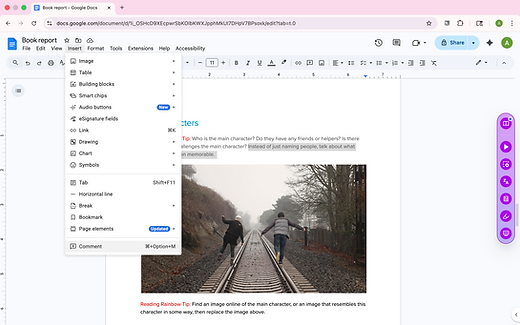
Step 5: Highlight the text where you want to leave voice feedback.
Step 6: In the menu at the top, click Insert - Comment.
Step 7: In the Comment box, click the purple Mote icon.
Step 8: Record your message, and then click the purple check mark and the blue Comment button.

Tool Demonstration Video
Click the video below to watch a 2-minute demonstration of Mote.

Mote Demo Video
Now you are ready to start practicing in Lesson 3.
bottom of page